If you work with Azure Kubernetes Service (AKS) in an enterprise environment, you’ve probably run into challenges with SSL inspection and custom certificates—especially when your organization uses a proxy that inspects outbound traffic. Recently, I faced this exact issue after upgrading to Azure Linux 3.0, and the usual community solutions just didn’t work anymore. Here’s how I tackled the problem and what you can do if you’re in the same boat.
Why Certificate Injection Matters
In many enterprise setups, SSL inspection is enforced for security reasons. However, this can cause headaches when AKS nodes need to pull images from third-party registries or communicate with services outside the standard Azure endpoints. If the proxy’s intermediate certificate isn’t trusted by your AKS nodes, you’ll see failures and endless troubleshooting.
Injecting your proxy’s intermediate certificate into the AKS cluster ensures that all inspected certificates remain trusted, keeping your workloads running smoothly.
The Problem with Azure Linux 3.0
With the latest changes introduced with Azure Linux 3.0, (AZ Local 2508 Release).I discovered that the previous methods for injecting certificates—widely shared in the Kubernetes community—no longer worked. Restarting containerd as part of the old process would send the pause container into a never-ending crash loop. Not ideal!
My Solution: A Reliable Workaround
After some trial and error, I found a method that works with Azure Linux 3.0 and is robust enough to handle both current and future node pools, including upgrades and scaling events.
Here’s what you need to do:
- Download the YAML Manifest
Grab the manifest from https://github.com/jasontayler/AzureLocalPublic/blob/main/az-local-aks-Inject-Proxy-certificate.yml - Update the Certificate Section
In the YAML file, locate the YOURCACERT PEM section. Paste your proxy’s intermediate certificate here.
Tip: YAML formatting can be tricky—make sure your PEM certificate starts at the beginning of the line, right after ca.crt:
   data:
     ca.crt: |
       -----BEGIN CERTIFICATE-----
       YOURCACERT PEM
       -----END CERTIFICATE-----
- Apply the Manifest
Save your changes and run:
kubectl apply -f filename.yaml- Monitor the Pods
Once applied, you’ll see one pod per node pool VM running in thekube-systemnamespace. These pods handle the certificate injection process.

- Check the Logs
Each pod logs its actions, so you can verify that the certificate was installed correctly and troubleshoot if needed.
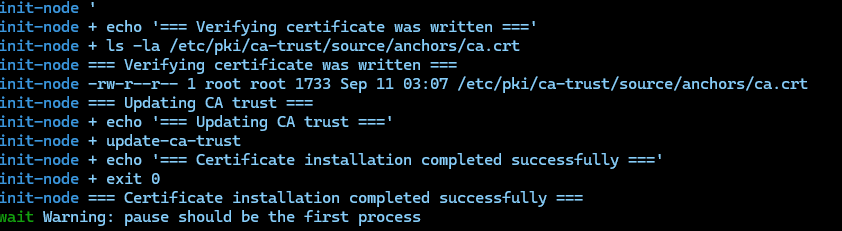
If you prefer a quieter setup, you can edit the YAML to remove the log/echo lines, but I recommend keeping them for easier troubleshooting.
Automation Options
If you’re using GitOps tools like Flux or ArgoCD, you can automate this process by managing the YAML manifest in your repository. This ensures that certificate injection is handled consistently across all clusters and node pools.
Looking Ahead
Microsoft has indicated that Arc Enabled AKS on Azure Local will eventually support this process natively. Until then, this workaround should help keep your clusters running smoothly with custom proxy certificates. I’ll be watching for updates and will share any new developments as they become available.
Final Thoughts
Certificate management in AKS can be a moving target, especially as the platform evolves. I hope this guide saves you some time and frustration if you’re dealing with SSL inspection and custom certificates in your environment. Happy clustering!
If you’d like the YAML manifest or want to see the latest updates, check out https://github.com/jasontayler/AzureLocalPublic/blob/main/az-local-aks-Inject-Proxy-certificate.yml.
No responses yet